Enterprise AI agent management and execution governance

Every AI run,accounted for.

We put project workspaces, models and agents, access, quotas and execution records in one place. Employees get a clear starting point. Administrators can see who used what and where.

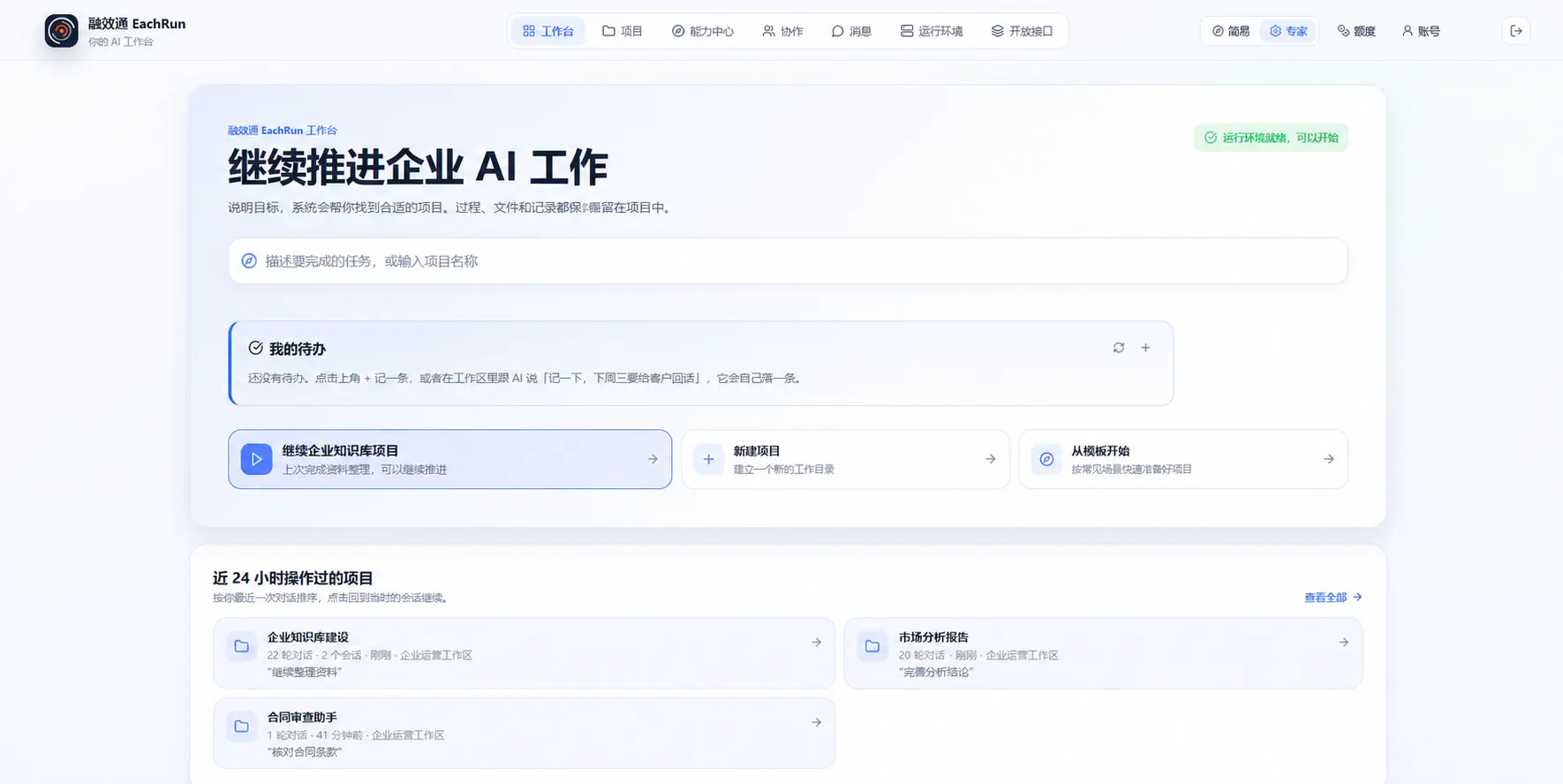
EachRun employee workbench showing projects, running workspaces and AI quota
Employees start work in one place. Each execution remains attached to its project and owner.

Starting an AI task is easy. Keeping it accountable is harder.

Your team still needs to know who started the work, what it used, what happened and where the output went.

We call that a finished run: the record stays with the project, someone owns the result and a colleague can pick up the work later.

Identity
Who or what started the run
Boundary
What data, tools and models it may use
Record
What happened during execution
Result
What was produced, and whether the run completed, failed or stopped

From access to review

How AI work enters company control

We bring work scattered across personal accounts, laptops and chat histories back into the project workspace.

  1. 01

    Enter a project

    An employee signs in through the platform and starts inside a project they may access.

  2. 02

    Request a workspace

    The employee requests an environment; an administrator reviews and assigns resources.

  3. 03

    Choose a capability

    The workspace exposes the models, agents, project files and tools configured by the company.

  4. 04

    Confirm before action

    Project roles limit access. Supported agents request approval before running tools or commands.

  5. 05

    Record usage

    User, workspace, project, runtime, model, status and token usage remain searchable.

  6. 06

    Share and hand over

    Projects, files and sessions can be shared by role and expiry, then revoked when needed.

One place to work, one place to manage it

Employees work inside project workspaces. Administrators manage access, resources and the same execution records.

Workbench

A clear next step from the first sign-in

Employees do not install an environment or track down keys. The workbench guides them through a workspace request, and they enter the project once an administrator approves it.

  • Request a workspace, an administrator approves it
  • Projects, running workspaces and remaining quota on one screen
  • Switch to the expert view when finer control is needed
EachRun workbench with the four-step getting started guide
Getting started: request a workspace, enter it, run the task, review the result.

Workspace

Keep project files and context in one workspace

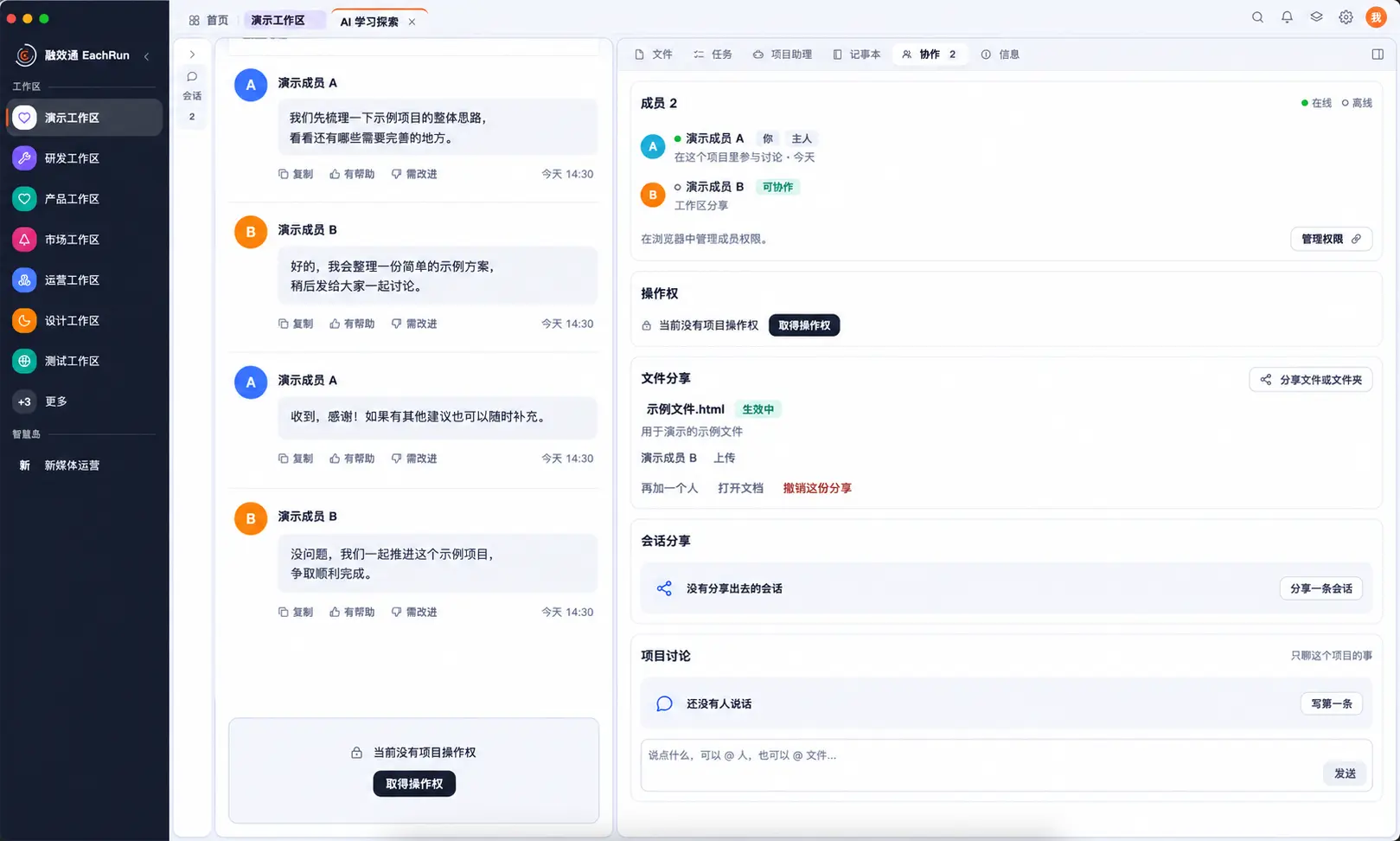
The workspace is the project's own environment. Files, context, tools and execution records live inside it, and a colleague can be added to the same workspace and continue.

  • A standard environment that does not depend on one person's laptop
  • Project files, context and execution records kept together
  • Several people in one workspace for collaboration and handover
EachRun project workspace interface
Project workspace: project files, tools and company-approved AI in one place.

Discover

Approved models and agents stay inside the project

Employees see only the capabilities connected by the company and allowed for the current project. They can switch models or agents without moving project files elsewhere.

  • The company connects models and agents once, not per employee
  • Availability follows role and project
  • Project context is kept when switching
EachRun workspace showing available AI skills and models
Available capabilities stay inside the project context, ready to use without moving files elsewhere.

Share center

Reuse work that the team has already done

The team can publish prompts, task templates and processes to the share center. They remain available when people change roles or leave the project.

  • Prompts, task templates and processes become team assets
  • New projects start from something already proven
  • The method stays when people change
EachRun template library with reusable project and workflow templates
Approved templates turn proven ways of working into assets the next project can reuse.

AI quota

Give every unit of AI usage an owner

Quota is assigned by user and plan. Employees see what remains, while administrators can review usage by workspace, project, runtime and model.

  • Set limits in advance instead of discovering spend later
  • Usage by person, workspace, project, runtime and model
  • Cost attributable to a project for internal allocation
EachRun workbench showing projects, active workspaces and remaining AI quota
Employees see remaining quota beside the projects and workspaces where it is used.

Admin console

Daily administration in one console

Administrators handle workspace resources, member access, model providers, approval requests and login records here.

  • Access control and roles decide who may use what
  • Model providers and keys held centrally, not scattered
  • Approvals, login logs and scheduled jobs in one place
EachRun administrator console overview with workspaces, agents, model access and tasks
Admin console: workspace resources, capabilities and models, tenants, projects and access.

Current product scope

What works now, and what needs pilot confirmation

We separate ready-to-use functions from items that need on-site confirmation, so you can estimate the implementation work.

Available now

Day-to-day platform management

  • Members, departments, roles and login audit
  • Workspace requests, approval, instances and resources
  • Model providers, channels and connection tests
  • Quota plans, user quotas and usage windows
  • Project, workspace, file and session sharing
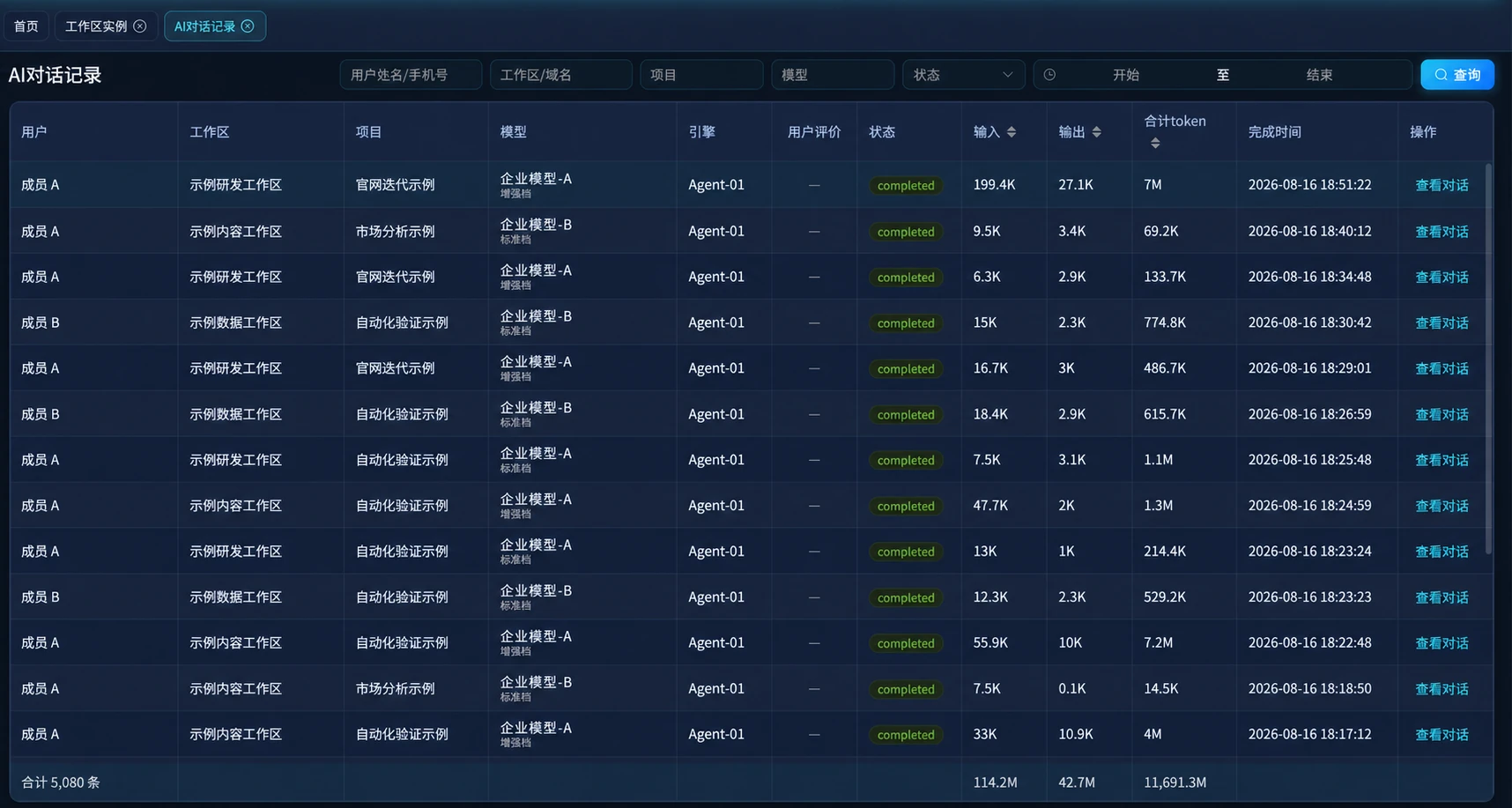
  • AI conversations, run status, tokens and user feedback

Configuration-dependent

Runtime controls

  • Read-only and project-write sandbox boundaries
  • User approval before tool and command execution
  • Viewer, editor and administrator project roles
  • Time-limited sharing and centralized revocation

Permission prompts differ by agent and are configured for the deployment in use.

Confirmed in pilot

External systems and environments

  • Specific models, agents and CLI integrations
  • CRM, ERP, ticketing and internal APIs
  • Private repositories, file systems and knowledge bases
  • Private deployment retention and network boundaries

Technical access is not the same as a stable interface or commercial permission. Each item is checked before delivery.

Real product screens

Access, usage and resource ownership are visible in the product

These are product screens. We replaced people, projects, agents, models and operating figures with demo data to protect internal information.

AI conversation records using demo labels, with status, token usage and completion time
AI conversation recordsSearch by user, workspace, project, model and status while retaining usage and completion time.
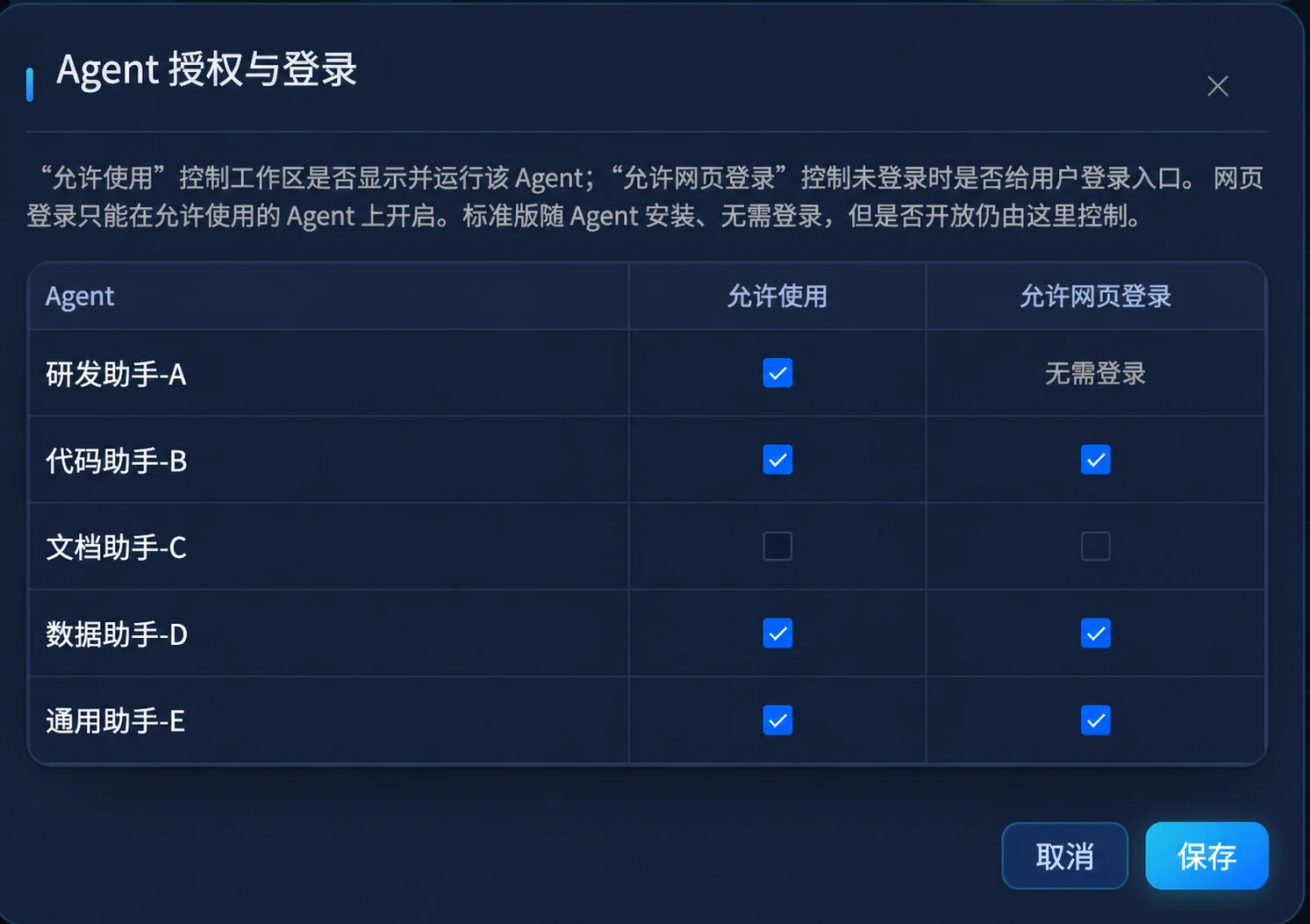
Agent access and web login settings using demo names
Agent accessAdministrators decide which agents may run in a workspace and whether web login is available.
Share center using demo labels for workspace, project, file and session access
Share centerWorkspaces, projects, files and sessions carry roles and an access lifetime.
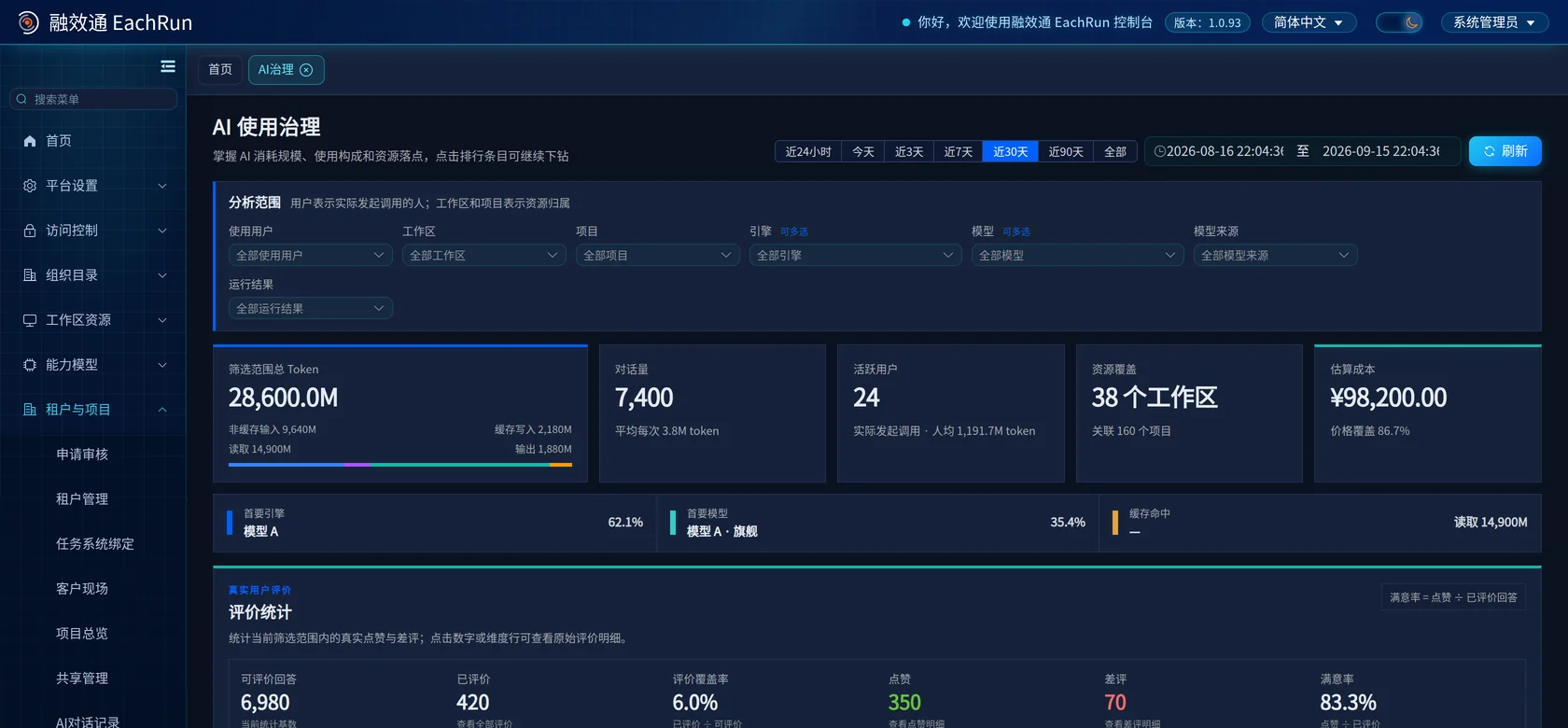
AI governance dashboard using demo usage, coverage and feedback data
AI governanceReview tokens, active users, resource coverage, estimated cost and real user feedback.
AI usage attribution and run outcome dashboard using demo labels and shifted figures
Usage and run outcomesBreak usage down by workspace, project, user, runtime and model, then review completed, failed and interrupted runs.

Security and boundaries

You decide what AI may see and do

Before deployment, we confirm data boundaries, record retention and integration scope with your team.

  • One identity Employees enter through the platform account, and usage is attached to the actual user, project and resource.
  • Layered access Models, tools, files and permitted actions are controlled by role, project and workspace.
  • Central key custody Model providers and CLI credentials are configured and distributed centrally instead of living in personal environments.
  • Execution records AI conversations remain attached to the user, workspace, project, runtime and model, with status and usage available for review.
  • Requests and approval Workspaces, resources and capabilities are granted through an approval flow that leaves a record.
  • Deployment choice Where data may not leave the organization, private or hybrid deployment defines the boundary.

Choose where it runs and how far it reaches

Start with one team, or plan for the whole company. It depends on your stage and your data requirements.

SaaS service

Hosted by us and ready to use, for teams validating the value first.

  • No environment to build
  • Per user or per team
  • Extend to more teams later
Ask about access

Enterprise team edition

For a department already rolling out, with directory, project spaces and usage reporting.

  • Organization and role access
  • Projects and workspaces
  • Usage and quota reporting
Ask about scope

Enterprise governance edition

For companies managing AI use across the organization, with the full governance set.

  • Access control and approval flows
  • Execution and login records
  • Budgets across teams and projects
Ask about scope

Private deployment

Runs inside your own environment, with data boundaries and model access defined by you.

  • Own data centre or private cloud
  • Data-stays-inside setup
  • Implementation and operations support
Ask about deployment

Hybrid deployment

Sensitive data stays inside, general capability uses external models, split by scenario.

  • Internal and external models by case
  • Model, network and data boundaries confirmed separately
  • Platform usage and records in one view
Ask about boundaries

Business system integration

Let CRM, ERP, OA and ticketing systems use AI through one entry point.

  • System identity and access
  • Usage and cost attribution
  • Scope confirmed during the pilot
Ask about integration

Set the terms before the pilot starts

We put the company entity, deliverables, acceptance measures and pricing basis in the project material and agreement.

Company

  • Legal entityChengdu March Orange Intelligent Information Technology Co., Ltd
  • OfficeRoom 1307, Block B, Junxin Building, No. 288 Shuyue East Road, Jinniu District, Chengdu
  • Phone400-030-8696
  • Emailsales@eachrun.com

What the pilot delivers

  • EnvironmentConfigured projects, workspaces, access and model connections
  • RecordsTask baseline, execution records, usage and cost detail
  • ConclusionBefore-and-after comparison with a recommendation
  • QuoteA formal quote based on actual usage and scope

How acceptance works

  • BaselineTime, rework and cost recorded before the pilot starts
  • ScopeOne team, one or two recurring tasks, agreed in writing
  • ComparisonSame measures applied again after four to six weeks
  • DecisionYou decide whether to stop, adjust or expand

What sets the price

  • ScaleNumber of users and teams
  • DeploymentSaaS, private or hybrid
  • ResourcesModel and execution resource usage
  • IntegrationWhich business systems must be connected

Prove one real task first

Pick work a team does every week. Run it for four to six weeks, compare it with the baseline, then decide whether to continue.

Discuss a pilot
Scope
One team and one or two recurring tasks
Period
Normally four to six weeks
Review
Compare the outcome with the baseline

What you receive at the end

  • Configured projects, access, models and execution resources
  • Task baseline, acceptance rules, usage and execution records
  • A before-and-after comparison to stop, adjust or expand with evidence

Pricing depends on team size, deployment, AI resources and integration scope.

Common questions

What is EachRun?

We help companies manage project workspaces, models and agents, access, quotas and execution records in one place. The work stays with the team when people change.

How is this different from personal AI tools such as ChatGPT or Cursor?

Personal AI tools are useful for individual work. We add shared project workspaces, company access rules, quotas and execution records, so colleagues can work together or take over later.

Do we have to replace our existing AI tools and business systems?

Usually not. We first inventory your models, knowledge bases, repositories and business systems, then confirm the integration scope during the pilot.

What can EachRun manage today?

Today you can manage members and roles, workspace requests and instances, model channels, user quotas, resource sharing and AI conversation records. Usage is searchable by user, workspace, project, runtime and model. Tool approval, sandbox boundaries and external integrations depend on the agent and deployment setup.

Does EachRun only retain logs?

Logs are one part of it. Project roles control access, quota windows limit consumption, and supported agents ask for approval before running tools or commands. Administrators can then search records by user, project, model and status.

Is private deployment supported?

Yes. Alongside the SaaS service, enterprise, private and hybrid deployments are available so data boundaries and model access can match your requirements.

Is it hard for employees to start?

Employees do not install an environment or configure keys. On first sign-in the workbench guides them to request a workspace, and they begin once an administrator approves it.

How are the pilot and pricing determined?

A pilot normally uses one engineering or IT team and one or two recurring tasks for four to six weeks. Time, rework, cost and results are recorded before the pilot and compared afterwards. Pricing depends on team size, deployment, model and execution resources, governance requirements and integration scope.

Start with one real AI task.

Tell us which teams use which AI tools, and what is hardest to manage across cost, access, handoffs or execution records.

Phone400-030-8696 Emailsales@eachrun.com
WeCom WeCom contact QR code Scan to contact our business team